So our project uses AI for two things. It reads photos and PDFs of receipts and invoices and turns them into data. And it has a chat where you ask questions about your business data. I wanted to know which Claude model we should run it on. Haiku is super cheap, Sonnet is in the middle, Opus is the expensive one. Instead of reading benchmarks I just tested them on our own stuff.
This post is what I did, what came out, and a bunch of things I got wrong along the way.
How I tested
I made two evals. Both are graded by code, no model judging another model.
The first one is 24 real receipts and invoices. For each one I wrote down the right answer by hand. A read only passes if all the important fields are right and the total it would book is right.
The second one is 37 chat conversations against a test business. The grader checks which tools the model called and if the answer has the right numbers in it.
Both are split in train and test. When I changed something I only looked at the train failures, and then used the test part to see if the change also helped there. Every case ran more than once, because one run tells you almost nothing.
First results
I tried 5 setups. Haiku 5.5 on medium and high effort, Sonnet 5.5 on low and medium, and Opus 5.5 on low. Every case ran twice, so 48 document reads and 74 chat runs per setup. All of it cost me $22.43.
| Setup | Chat | Docs read right | Docs matched right | Per doc | Per chat |
|---|---|---|---|---|---|
| Haiku medium | 96% | 75% | 88% | $0.006 | $0.0014 |
| Haiku high | 95% | 71% | 81% | $0.006 | $0.0015 |
| Sonnet low | 99% | 83% | 100% | $0.078 | $0.020 |
| Sonnet medium | 99% | 85% | 100% | $0.078 | $0.020 |
| Opus low | 100% | 94% | 98% | $0.163 | $0.046 |
"Matched" means every line on the document went to the right product or account. The doc prices are list prices before cache discounts, so in reality a bit lower. The chat prices are what I actually paid.
So at first it looked simple. Opus is the best on documents, chat is close for everyone, and Haiku is way behind on documents. But it wasn't that simple, and most of this post is about why.
One thing I found later. A small helper call in the document part always used Sonnet, in every setup, also when I was testing Haiku or Opus. So the Haiku and Opus doc numbers are not 100% that model alone. I fixed it later.
Price per correct answer
Price per call doesn't really tell you much. What I care about is how much I pay for one correct answer.
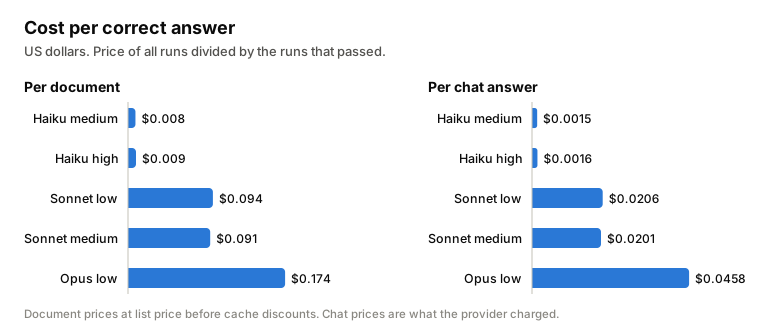
Even with only 75% right, Haiku was 11 times cheaper per correct document than Sonnet, and 21 times cheaper than Opus. In chat it was 13 times cheaper than Sonnet and 30 times cheaper than Opus.
So the question for me became something else. Not "is Haiku as good as Opus", but "can I fix the 25% that Haiku gets wrong, for less money than paying 10 times more".
The effort setting never arrived
This is the embarrassing part.
I wanted to compare effort levels, low vs medium vs high. On documents I got the same accuracy, same cost and same speed for all of them, which made no sense. So I logged the requests we actually send to the model. The effort field was just not there.
The agent framework we use for the document part removes the reasoning settings when the model is not from the vendor the framework is made for. It does this silently. So every effort setting we had was ignored, for weeks, and every model ran at its own default.
That means my document numbers above are not effort numbers at all. Haiku "medium" and Haiku "high" both ran at medium, which is the Haiku default. Sonnet "low" and Sonnet "medium" both ran at high, the Sonnet default. And Opus "low" was really medium. In my first report I wrote that effort makes no difference on documents. That was just wrong, I never compared it.
The chat uses a different library and there the effort did arrive. So for chat I can actually say it. Haiku medium vs high was 96% vs 95%, Sonnet low vs medium was 99% vs 99%. More thinking didn't help on these cases.
After fixing it I measured effort again on Haiku for documents. Low got 68/72 at $0.0062 and 23 seconds per doc, medium 69/72 at $0.0066 and 26 seconds, high 69/72 at $0.0077 and 34 seconds. Pretty small differences, so we kept medium. But one thing broke at low. The step that finds the document inside a photo got sloppy and cut off the part with the amounts. It was always running at medium before without anybody knowing, so the "low" in our code was never real.
If a setting changes nothing, first check that it really reaches the model.
Same setup twice
The bug had one good side. Without knowing it I ran the exact same setup two times on documents.
Haiku got 75% and 71%. Sonnet got 83% and 85%. Same model, same prompt, same documents. The difference is only randomness. With 48 runs, 4 points means nothing.
Opus looked clearly better with 94%. But its likely range was 83% to 98%, and Sonnet's was 73% to 93%. They overlap, so honestly I can't say Opus is better. Maybe it is, maybe not.
If you compare models with less than about 100 runs, run one setup twice first. Then you see how big a difference has to be before you believe it.
The chat eval was too easy
Sonnet and Opus passed 73 or 74 out of 74. The only Sonnet fail was a style rule, not a wrong number. So at this point the chat eval can't show any difference between them, even if there is one.
99% looks like good news, but it actually means the eval stopped measuring anything. If I want to compare the bigger models on chat again, I need harder cases first.
When every model failed
Two documents failed in all 5 setups. Even Opus. My first thought was that my answer key was wrong, so I checked both by hand against the photos. The keys were fine.
The problem was on our side. In one case our own processing cut off the bottom of the image before the model even saw it, in 4 of 6 tries. The model did the best it could with half a receipt. In the other case our instructions left one field unclear, and every model filled it in its own way.
I fixed only these two things and ran Sonnet again on the same documents. It went from 41/48 to 48/48, for the same cost per document.
That jump is bigger than the whole gap between Sonnet and Opus. So a big part of "the bigger model is better" was really "the bigger model is better at working around our mistakes".
Where the bigger models were still better
They do win in some places, with real numbers.
Haiku sometimes broke the output. In 12 of 96 document runs we couldn't use what it returned, and a few times it sent back the description of the format instead of the data. Sonnet and Opus had 0 of 144.
There is one tiny blurry receipt photo. Opus read the shop name right 2 of 2 times, Sonnet 2 of 4, Haiku 0 of 4.
Matching lines to products was also better on Sonnet. It never matched a line wrong in 96 runs. Haiku did it 3 times in 96.
And Haiku's most common reading mistake was the document number. Sonnet's was the tax total, and that one turned out to be our unclear instruction.
So the bigger models are more forgiving. Bad photos, unclear instructions, they deal with it better. If you can't control those things, that's worth paying for. If you can, a lot of it can be fixed around a smaller model.
Small wasn't faster
I expected Haiku to be the fastest one. It wasn't.
In chat the median per case was 4.2 to 4.4 seconds for Sonnet, 5.8 to 7.1 for Haiku and 6.2 for Opus. For documents it was 18 seconds for Sonnet, 25 for Haiku and 31 for Opus.
Haiku is way cheaper per token, but it writes a lot more. Around 5,060 output tokens per document vs 2,600 for Sonnet, and 587 per chat case vs 356. More to write means more time. So if speed matters to you, measure it, don't guess it from the model size.
Then I tried to make Haiku better
Because of the price per correct answer, I spent a few days trying to push Haiku up. Some fixes were quick. Asking for the result as a tool call instead of free text took the broken outputs from 12 of 96 to zero. And reading a document a second time when its lines don't add up to the printed total caught missed discounts. After that Haiku was at 93 to 96% on documents and 97 to 100% on chat.
The rest of this post is about the last few percent, and about the stuff the evals didn't see.
The eval got too full to show anything
At 69 of 72 document runs passing, the score moves by 2 or 3 runs just from noise. A real improvement and a lucky run look exactly the same.
What helped was measuring one step below the eval. Remember the second read when the totals don't match? The eval only saw the final result, so that second read was hiding first read mistakes. When I measured only the first read, every document 5 times, the problems became visible. One invoice with a discount was wrong half the time on the first read, while the eval said it passed every time.
For one specific problem I ran one document or one chat case 10 to 20 times. That's cheap on a small model, and you get "7 of 20 vs 2 of 20" instead of "seems a bit better".
Dates and cut off numbers
Our instructions said something like "only return the date if it's unambiguous". A date like 08/12/2025 is technically ambiguous, so Haiku sometimes just returned no date. Even though in our documents the day always comes first.
Same with numbers cut off by a fold in the paper. Haiku read the number fine, then decided it was "truncated" and put it aside as uncertain instead of in the field where it belongs.
What fixed both was removing the way out, not adding more caution. Read dates day first unless the document is from a country that writes month first. A number partly hidden by a fold still goes in its field. Both problems went to zero in repeated runs.
Money format
The chat has a rule for how to write money. In one language Haiku kept writing it in that language's local style anyway, in about 1 of 5 answers. The tool data had plain numbers, so that was just the model's habit.
Rewording the rule did nothing. What worked was one sentence that shows the wrong form next to the right one, like "write it like this, never like that". It went from 16 bad answers in 82 to none.
Small models follow a concrete example much better than an abstract rule.
The blurry receipt
Remember the tiny blurry receipt only Opus could read? The photo is about 400 by 600 pixels and the shop name is printed in a worn stylized font. My first idea was to just upscale it for Haiku.
At 1x it got 0 of 10 right. At 1.25x 7 of 10, at 1.5x 9 of 10, then at 1.75x 0 of 10 again, at 2x 3 of 10 and at 3x 0 of 10. That's not a trend, it's a lottery. Claude looks at images in 28 by 28 pixel patches, so at every scale the letters land on the grid differently, and with blurry letters that decides the reading. If I picked 1.5x because it won on this one photo, I would be tuning to noise. So I dropped it.
The better way is to use something the model reads reliably on the same receipt, a registration number, and look the name up in an official registry. Sometimes the fix is to stop asking the model for the thing it can't see.
Language
This one I didn't solve, and it's the most interesting.
A short, casual question in our language, something like "who owes me the most?", got an answer in English in 35 to 45% of runs. The test business has customers with English names and the tool results are English data, and the English answers always started with a customer's name and then just continued in English. When I asked directly what language the question was in, Haiku said the right language every time. It knew, it just drifted. About once in 200 answers it even switched to a completely different language.
I tried six versions of the language instruction. Naming the language in words instead of a code. Saying that the tool data is in English and that this doesn't change the reply language. Moving the rule to the very end of the system prompt. An example of a short casual question in our language. A rule that sentences starting with a name stay in the user's language. And a reminder right before the answer.
None of them helped. Some made it clearly worse, up to 19 of 20 answers in English. It seems like any instruction that mentions English pulls the model toward English. Higher effort made it worse too.
And no grader checked the reply language, so all of these runs passed.
Stuff the graders didn't check
The money format and the language drift both passed the evals. I only found them because I scanned every answer from every run for things the graders don't look at, like which script the text is in, the number format, internal ids, links. A few lines of code found the two most visible problems of that week.
Now I see an eval run as data to read, not only a score.
Stuff that didn't help
Putting the image before the text in the prompt. The docs recommend it, but on our documents it changed nothing measurable.
Higher effort for reading images or for the language problem. No better on blurry text, worse on language.
Upscaling small photos, see the lottery above.
A rule like "prefer real words" for unclear names. No effect at all.
Another small model
Just out of curiosity I also ran another vendor's small model, GPT-6 Luna, which has the same price per token, on the same evals with the same code. It used fewer tokens, so it was about 60% cheaper per document. But it read 58 of 72 documents right vs 69 for Haiku, mostly wrong digits and names on phone photos. And it passed 104 of 111 chat cases vs 109. One chat failure happened every time. Asked to record a customer's payment, it searched for the customer among the suppliers and gave up, 3 out of 3. So same price per token doesn't mean same price per correct answer.
Where it ended
| Haiku at the start | Haiku after the work | Sonnet | Opus | |
|---|---|---|---|---|
| Docs read right | 71 to 75% | 96% | 83 to 85% | 94% |
| Chat right | 95 to 96% | 98% | 99% | 100% |
| Price per doc | $0.006 | $0.007 | $0.078 | $0.163 |
The Sonnet and Opus columns are from before the fixes, and every fix helps every model, so it's not a fair race. Sonnet went to 48/48 on documents once two of our own mistakes were fixed. So for me the question is less "which model is best" and more "what can you control". If you can fix your input and your instructions, a small model gets surprisingly close for a tenth of the price.
What I'd do again
- Look at price per correct answer, not price per call.
- Run one setup twice before trusting a difference, and run single cases 10 to 20 times.
- If every model fails the same case, check your own system first.
- When an eval gets to 99%, make it harder, or measure the step under it.
- Log what you really send to the model. A setting that changes nothing might not be arriving at all.
- Read the raw outputs before changing anything. Most fixes came from seeing how the model failed, not that it failed.
- Take the way out away from the instructions. Small models use the way out you give them.
- Show the wrong form next to the right one.
- Don't fix one image. If a fix only works on the one file you tested, it's noise.
- Scan all outputs for rules the graders don't check.
- Measure speed. Small isn't always fast.
- Know when to stop prompting. After six failed versions it's time to change the system around the model, not the words.
The bigger models are still better at forgiving my mistakes. But most of those mistakes I could fix, and that was way cheaper than paying a model to work around them.